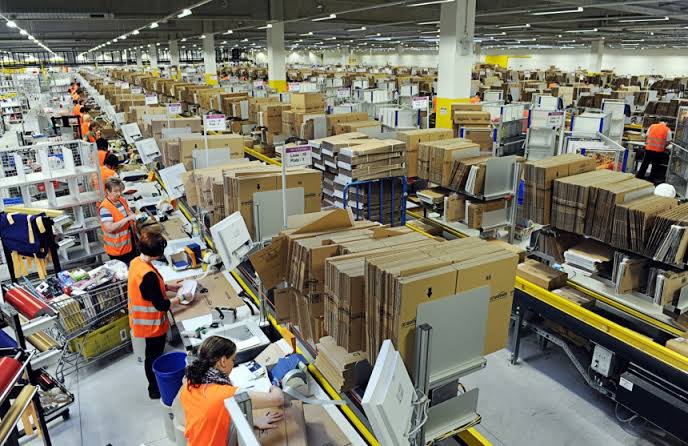
If you run an ecommerce business, your warehouse can become difficult to manage as orders pick up. You have stock coming in, products moving around the warehouse, orders waiting to be picked, and packages going out every day. Keeping track of all of that with spreadsheets and manual updates gets harder as you grow.
So, what is cloud WMS? In simple terms, it is a warehouse management system that runs online. It gives you one place to keep an eye on inventory, orders, picking, packing, and other warehouse operations. With Ship with Mina , ecommerce brands can handle their warehouse and fulfillment needs as they grow.
What Is a Cloud WMS?
A cloud WMS is a cloud-based warehouse management system that helps run the day-to-day work in a warehouse.
Think about everything that happens after your products arrive. Someone has to receive them, find somewhere to store them, keep the inventory count accurate, pick products for orders, pack those orders, and get them shipped. A WMS system brings those jobs into one system instead of leaving your staff to keep track of everything separately.
Because the software is hosted online, you can access it over the internet. That is one of the biggest differences between cloud warehouse management and older warehouse systems that run on local hardware.
A cloud-based WMS can also connect with other software. For an ecommerce business, that could include an online store, marketplace, shipping software, or transportation management systems. Orders can flow into the WMS while inventory and fulfillment updates flow back out.
How Does a Cloud-Based Warehouse Management System Work?
The basic idea is pretty straightforward. A product arrives at the warehouse and gets recorded in the system. The WMS knows how much stock came in and where it was put away. When someone buys that product, the order appears in the system and the warehouse knows what needs to be picked.
Once the item is picked and packed, its status is updated. Inventory changes at the same time. That gives you real-time visibility into warehouse activity instead of relying on someone to update a spreadsheet later in the day.
Differences Between Cloud WMS and On-Site Systems
The main difference between a cloud WMS and an on-premise WMS is where the software lives.
With an on-premise WMS, the software is installed on your company's own servers or computers. You are responsible for the hardware, maintenance, security, and software updates.
Cloud-based WMS systems work differently. The software runs on the provider's cloud infrastructure, so you access it online. The provider handles much of the technical maintenance behind the scenes.
An on-premise WMS solution can make sense for certain businesses, especially those with specific technical requirements. For many growing companies, though, a cloud-based solution is easier to get started with and manage.
It can also be a better fit when you have more than one warehouse or need people in different locations to access the same information.
What Does a WMS Do?
Cloud-based WMS solutions manage the movement of products through your warehouse. The exact features depend on the software, but most systems cover the main warehouse tasks below.
1. Receiving and Putaway
When a shipment arrives, someone needs to check what came in and record it where the WMS can log the products and quantities, then help staff decide where those products should be stored. That first step is important because an incorrect stock count can cause problems later when customers start placing orders.
Good receiving and putaway processes also make products easier to find when it is time to pick them.
2. Real-Time Inventory Tracking
You need to know what you have before you can sell it and a Cloud WMS software keeps track of inventory as products move through the warehouse. Stock comes in, stock gets picked, stock gets shipped, and the numbers change.
Having that information in real time makes inventory management much easier. You can see what is available, spot low-stock items, and get a better idea of where your inventory is sitting. This becomes even more useful when you have several warehouse locations.
3. Order Processing and Picking
Once an order comes in, somebody has to find the products and the WMS software tells warehouse staff what needs to be picked and where to find it. Some systems can also group orders or plan picking routes to cut down on wasted time.

For a busy warehouse, those small improvements add up. Staff spend less time searching for products and more time getting orders ready to go.
4. Packing and Shipping
Picking the right products is the first part of the job. They still need to be checked, packed, labeled, and shipped.
The WMS keeps the order information together throughout the process. Depending on the system, it may also connect with shipping platforms and carriers. That makes it easier to move an order from the warehouse floor to the customer without entering the same information over and over.
5. Returns Management
Returns can make inventory management difficult, especially when they are handled outside your main warehouse system.
A WMS can record returned products and show what happens to them next. An item might go back into sellable inventory, need an inspection, or be taken out of stock. Having a record of each return helps keep your inventory numbers closer to reality.
6. Reporting and Analytics
A good WMS tells you where a product is and shows what is happening across the warehouse. You might use reports to look at order volumes, inventory levels, picking activity, or warehouse performance. That information can help a warehouse manager spot slow areas and make better decisions about staffing and daily warehouse operations.
Benefits of Using Cloud WMS
There is a reason more businesses are moving their warehouse management software to the cloud. The setup is often simpler, and the system can grow with the business.
1. Lower Costs Upfront
An on-premise WMS can come with a large initial bill. You may need servers, hardware, installation, and technical staff to keep everything running.
A cloud-based solution uses the provider's cloud infrastructure instead. You generally pay for access to the software rather than building and maintaining the technology yourself. The exact cost depends on the WMS provider, so always check what is included in the price.
2. Faster to Implement
Getting an on-premise system running can take a fair amount of technical work. Cloud-based WMS software can be quicker to set up because the infrastructure is already there. You still have to configure the system and train staff, but there is less hardware to worry about. That can make a difference for a business that needs a WMS solution quickly.
3. Easier to Scale During Peak Seasons
Your order volume may look very different in November than it does in February. However, a cloud-based system gives you more flexibility as order volumes change. Depending on the platform, you can add users, manage more orders, or bring additional warehouse locations into the same system.
That makes cloud WMS solutions useful for businesses with seasonal sales or plans for rapid growth.
4. Accessible from Anywhere
You do not have to be sitting in the warehouse to check the system.
Since a cloud-based system is available online, authorized users can access it from different locations. That is handy when a company has several warehouses or a manager needs to check inventory while away from the warehouse. It also makes communication easier when different parts of the business are working from different places.
5. Low Error Rate in Fulfillment
There are plenty of opportunities for mistakes when warehouse work is handled manually.
Someone can enter the wrong inventory number or pick the wrong product. A cloud WMS can automate parts of these processes and keep information updated as stock moves. Consequently, you can reduce avoidable errors and improve warehouse efficiency, particularly as order volumes increase.
Cloud WMS and Ship with Mina 3PL
Ship with Mina has a global fulfillment network built for ecommerce businesses shipping to customers in different markets.
Its network includes more than 20 warehouses in China, 3 US warehouses, 2 Canadian warehouses, 1 Australian warehouse, and 9 partnered warehouses in Europe.
That gives brands access to warehouse locations in key markets without having to build their own international warehouse network. Keeping inventory closer to customers can also help businesses manage international fulfillment as they expand.
Ship with Mina also uses AI-powered pick and pack technology within its fulfillment operations. The goal is to make it easier to handle high order volumes while keeping warehouse tasks moving.
For a business working with a 3PL, the warehouse side of fulfillment is handled for you. You still get visibility into your orders and inventory while the 3PL takes care of the physical work.
How to Choose the Right Cloud WMS
The best WMS system for one business may be completely wrong for another. Start with what your warehouse actually needs instead of looking for the software with the longest feature list.
1. Integration

Look at the systems you already use.
If you sell through Shopify, Amazon, or another ecommerce platform, check that the WMS can connect with it. The same applies to shipping software, order management systems, and transportation management systems. After all, good integrations save your staff from entering the same information into different systems.
2. Ease of Use
The people using the software every day should be able to understand it without constantly asking for help. So, pay attention to how easy it is to find inventory, process orders, and complete common warehouse tasks. A complicated system can create more work instead of reducing it.
3. Scalable with Multi-Warehouse Support
Your current warehouse may not be your only one for long and if you plan to expand into new markets, look for cloud warehouse management systems that can handle multiple warehouse locations. You want inventory and orders to remain easy to manage when your operation gets bigger.
4. Clear Pricing
Cloud WMS providers use different pricing models. Some charge monthly, while others base their pricing on orders, users, or features. Look at the full cost. Setup fees, integrations, additional users, and support may all affect what you actually pay.
5. Onboarding and Support
A new WMS can change how your staff work, so the setup process matters.
Ask what onboarding looks like and what happens if you run into a problem after launch. Responsive support can save a lot of frustration when the software is part of your daily warehouse operations.
Cloud Warehouse Management and the Future of Warehouse Management
Warehouse technology is changing as ecommerce businesses handle more orders and more warehouse locations. Cloud-based WMS systems are part of that change. They give businesses a way to connect warehouse operations, inventory management, order processing, and parts of supply chain management in one place.
Warehouse automation is also becoming more common. As these tools develop, cloud-based WMS platforms can work alongside other warehouse systems and give businesses better information about what is happening on the warehouse floor.
That is where cloud warehouse management can make a difference. You get a system that can keep up with the business instead of having to rebuild your setup every time the operation grows.
Conclusion
A cloud WMS is a warehouse management system that runs online. It helps businesses keep track of inventory and manage the work involved in receiving, picking, packing, shipping, and returns.
For a growing ecommerce business, cloud-based WMS software can make warehouse operations easier to keep under control. It can also make it simpler to manage multiple warehouse locations and give people access to the same information from different places.
When choosing a WMS solution, focus on what your business needs today and what it may need later. Integration, ease of use, scalability, pricing, and support are all worth checking before you make a decision.
Frequently Asked Questions
What does WMS stand for?
WMS stands for Warehouse Management System. It is software used to manage warehouse operations and keep track of inventory as products move through a warehouse.
How much does a cloud WMS cost?
There is no fixed price. The cost depends on the WMS provider, the features you need, your order volume, number of users, and integrations. Additionally, sSome cloud WMS providers charge a monthly subscription, while others use usage-based pricing. Check for setup and extra fees before signing up.
Is cloud WMS secure?
Cloud WMS providers use security measures to protect the information stored in their systems. The exact protections vary by provider, so check how a company handles data, user access, backups, and security before choosing its software.
Can a cloud WMS integrate with Shopify or Amazon?
Yes. Many cloud-based WMS platforms can integrate with Shopify, Amazon, and other ecommerce platforms. This lets order and inventory information move between the sales platform and your WMS system, reducing the amount of manual data entry your staff has to do.
Do I need my own WMS if I work with a 3PL?
Not necessarily. A 3PL may already have warehouse management software that handles inventory, orders, and fulfillment. Before paying for a separate WMS, find out what your 3PL's system can do and what access you get. If it covers the warehouse management features you need, you may not need another system.